Emotion service
The emotion service provides the API's ability to call the device's "emotions". As an emotion service access agent, EmotionManager provides the main API of the emotion service, which can be obtained through the RobotContext object.
EmotionManager emotionManager = aRobotContext.getSystemService(EmotionManager.SERVICE);
Display emotions
When the device is required to display emotions such as "happy", "angry", "sad", and "laugh", like humans do, it can be achieved by displaying the emotions.
promise /* [2] */ = emotionManager.express(Uri.parse("emotion://va/happy") /* [1] */)
    .progress(new ProgressCallback<ExpressingProgress>() {
        @Override
        public void onProgress(ExpressingProgress expressingProgress /* [3] */) {
            // Callback the display process of the emotions
        }
    })
    .done(new DoneCallback<Void>() {
        @Override
        public void onDone(Void aVoid) {
            // Callback the emotions finish displaying
        }
    })
    .fail(new FailCallback<EmotionException>() {
        @Override
        public void onFail(EmotionException e) {
            // Callback the emotion display failed
        }
    });
[1]The unique identification of the emotion to be displayed.
[2]Return the asynchronous object that is waiting to display progress and results. Through the object, you can wait or monitor the progress and results, or cancel the display process. See Promise for specific usage.
[3]The ExpressingProgress object of the asynchronous callback describes the progress information of the emotion display, including:
| Attribute getter | Descriptions |
|---|---|
| ExpressingProgress.progress | Progress information began: start of display ended: end of display |
By specifying options, you can adjust the action of the emotion display.
ExpressingOption /* [1] */ option = new ExpressingOption.Builder(
    Uri.parse("emotion://va/happy")).build();
promise = emotionManager.express(option);
[1] The ExpressingOption object is constructed using ExpressingOption.Builder. The instructions are as follows:
| Methods | Descriptions | Default value |
|---|---|---|
| Builder.constructor(uri) | The URI of the emotion to be displayed must be imported during construction | |
| Builder.setSticky(sticky) | Whether the display process is allowed to be interrupted true: cannot be interrupted |
false |
| Builder.setLoops(loops) | Number of loop display 0: unlimited |
0 |
| Builder.setExtension(extension) | Customized parameters | JsonObjectString.EMPTY_OBJECT |
If you need the device to cry and laugh like a human, you can specify multiple options.
ExpressingOption option1 = new ExpressingOption.Builder(
    Uri.parse("emotion://va/cry")).build();
ExpressingOption option2 = new ExpressingOption.Builder(
    Uri.parse("emotion://va/happy")).build();
promise = emotionManager.expressSerially(option1, option2 /* [1] */);
[1] The set of emotions to be displayed can also be written as follows:
List<ExpressingOption> optionList = new ArrayList<>();
optionList.add(option1);
optionList.add(option2);
promise = emotionManager.expressSerially(optionList);
If you want to know the emotion that is currently displayed, you can use the following code.
emotionManager.getExpressing();
The unique identifier of the emotion is returned.
If you want to know if there are any emotions on display, you can use the following code.
emotionManager.isExpressing();
If true is returned, it means that there are emotions on display.
Close the emotion
If you want the device to return to the normal interactive interface and no longer display emotions, use the following code.
emotionManager.dismiss();
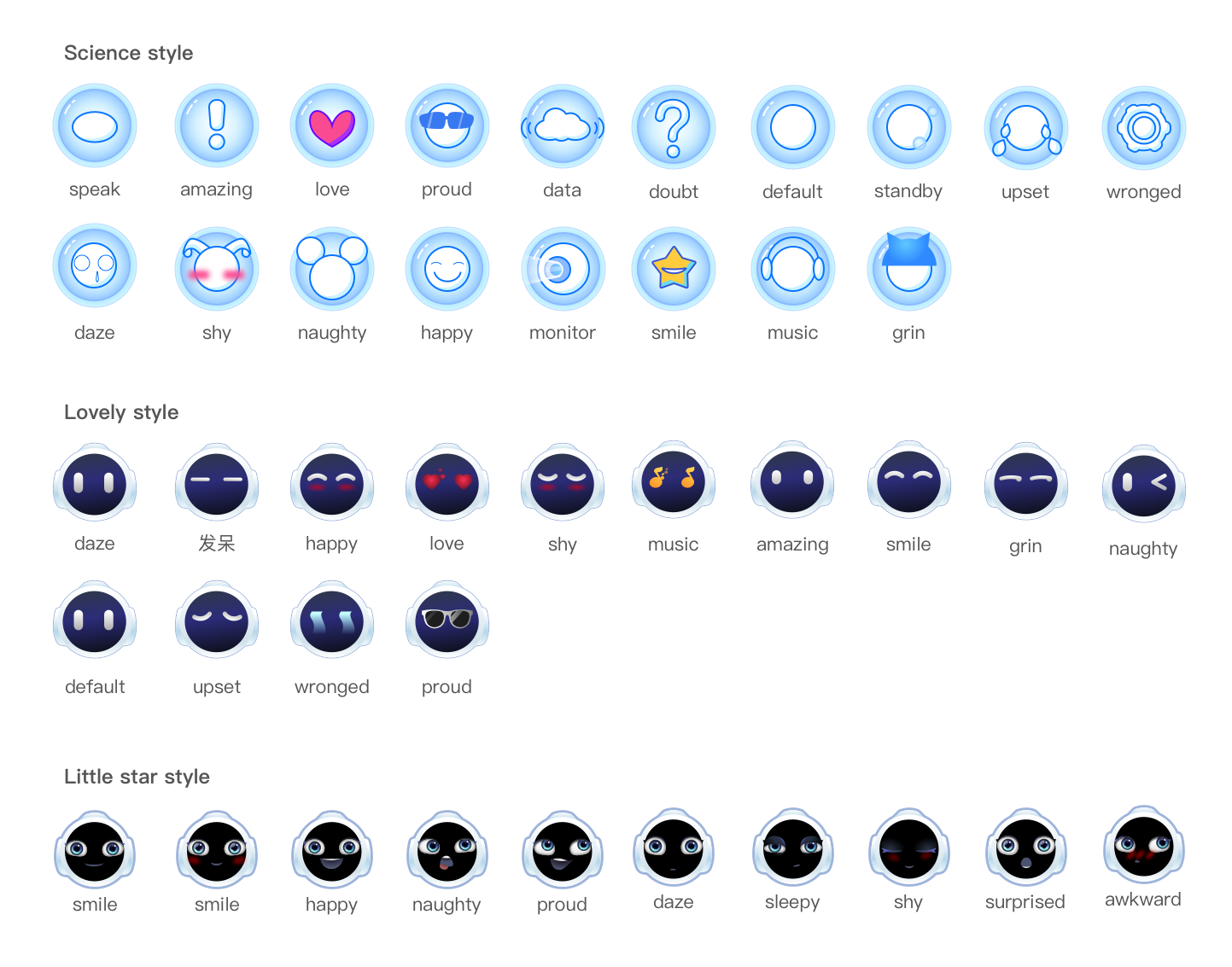
Emotion list
Science style
| name | id |
|---|---|
| daze | techface_daze |
| smile | techface_smile |
| happy | techface_happy |
| love | techface_love |
| shy | techface_shy |
| music | techface_music |
| speak | techface_speak |
| upset | techface_upset |
| amazing | techface_amazing |
| naughty | techface_naughty |
| grin | techface_grin |
| wronged | techface_wronged |
| proud | techface_proud |
| default | techface_default |
| data | techface_data |
| monitor | techface_monitor |
| standby | techface_standby |
| doubt | techface_doubt |
Lovely style
| name | id |
|---|---|
| daze | face_daze |
| happy | face_happy |
| love | face_love |
| shy | face_shy |
| music | face_music |
| speak | face_speak |
| upset | face_upset |
| amazing | face_amazing |
| naughty | face_naughty |
| grin | face_grin |
| wronged | face_wronged |
| proud | face_proud |
| smile | face_smile |
| default | face_default |
Little star style
| name | id |
|---|---|
| proud | littlestar_proud |
| daze | littlestar_daze |
| sleepy | littlestar_sleepy |
| awkward | littlestar_embarrassed |
| shy | littlestar_shy |
| amazing | littlestar_amazing |
| happy | littlestar_happy |
| naughty | littlestar_naughty |
| smile | littlestar_smile |
| like | littlestar_love |
Emotion picture